


在Comfyui安装节点插件时会碰到一些麻烦,由于部署的软硬环境不同,会出现很多兼容性问题。但这次我碰到的问题是另一种情况,想也没想到。
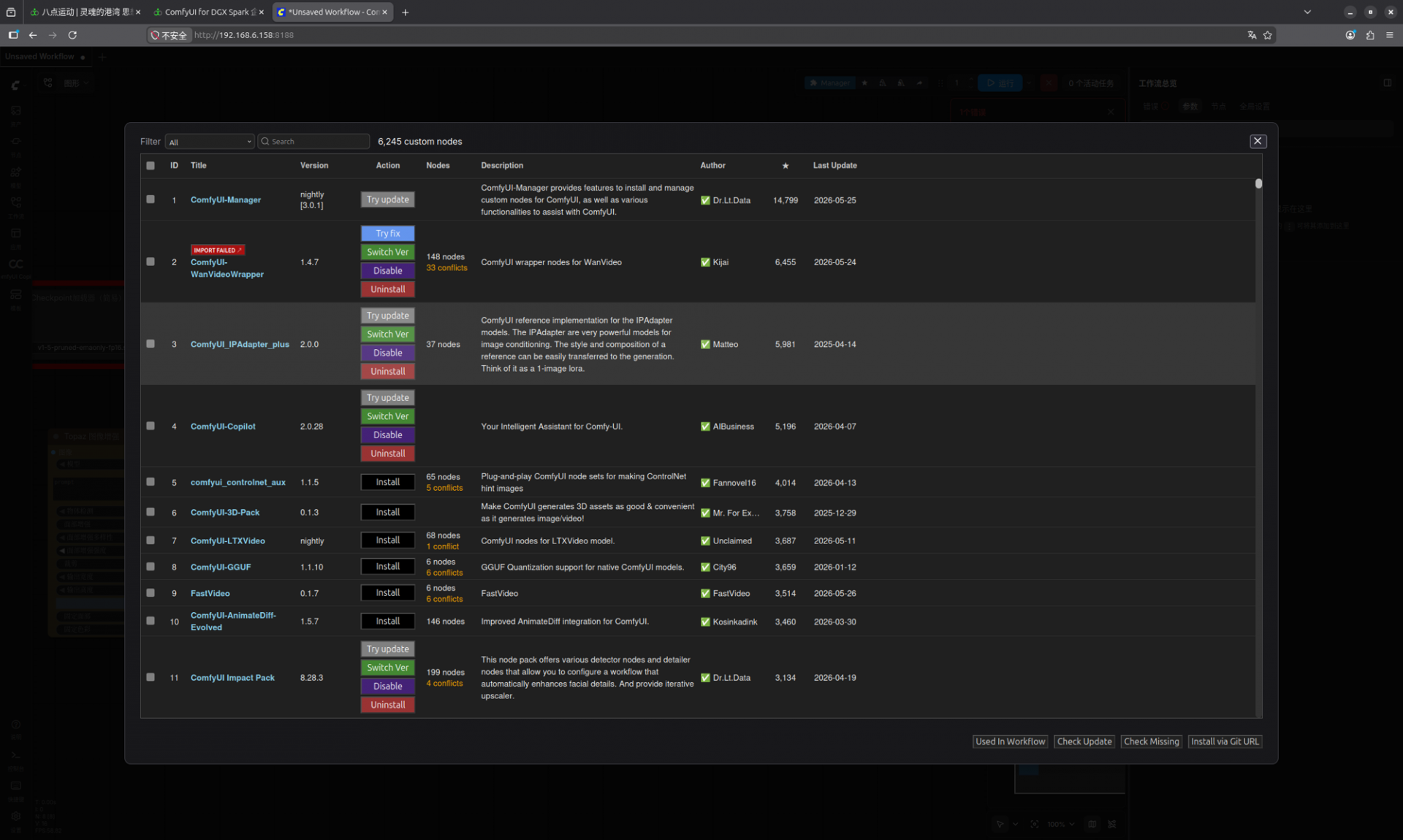
插件安装过程中没有报任何错误,但在重启服务时,Comfyui停止工作了。第一时间想到的是可能其中一个插件出现兼容性问题,但由于我又是一次性安装了多个节点插件,无法判断是其中哪一个。某个新安装的节点导致 ComfyUI 启动崩溃。文章源自EightPoint-https://www.8oio.com/comfyui%e8%8a%82%e7%82%b9%e5%ae%89%e8%a3%85%e6%97%b6%e7%9a%84%e6%95%85%e9%9a%9c%e6%8e%92%e6%9f%a5%e4%b8%8e%e8%a7%a3%e5%86%b3/567/
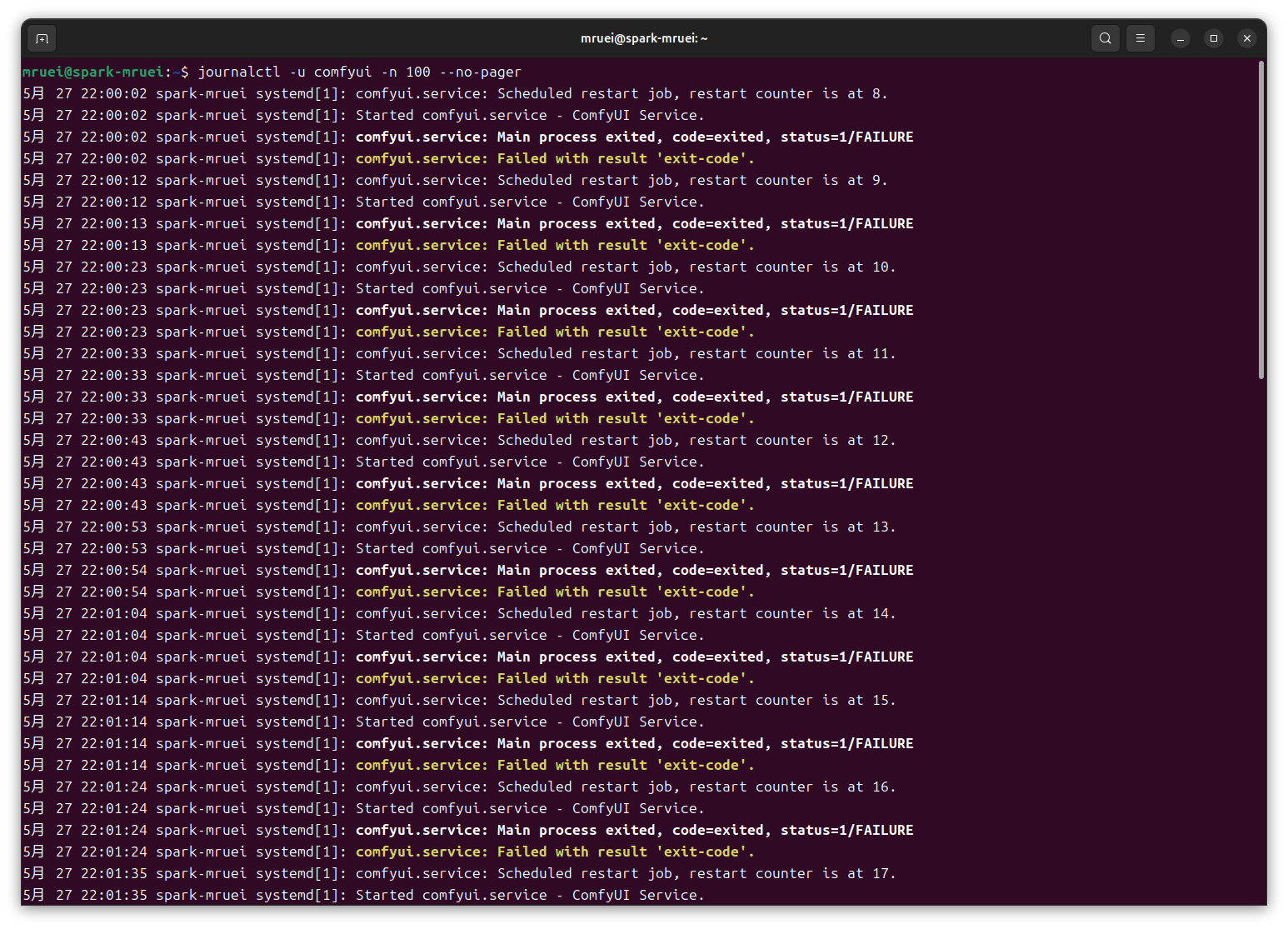
尤其 DGX Spark 是ARM64 (aarch64)架构,兼容性导致的故障可能性更大,先通过命令,文章源自EightPoint-https://www.8oio.com/comfyui%e8%8a%82%e7%82%b9%e5%ae%89%e8%a3%85%e6%97%b6%e7%9a%84%e6%95%85%e9%9a%9c%e6%8e%92%e6%9f%a5%e4%b8%8e%e8%a7%a3%e5%86%b3/567/
journalctl -u comfyui -n 100 --no-pager
或文章源自EightPoint-https://www.8oio.com/comfyui%e8%8a%82%e7%82%b9%e5%ae%89%e8%a3%85%e6%97%b6%e7%9a%84%e6%95%85%e9%9a%9c%e6%8e%92%e6%9f%a5%e4%b8%8e%e8%a7%a3%e5%86%b3/567/
tail -100 /opt/ai/logs/comfyui.log
来查看由哪个节点插件导致的故障原因,但实际发现无法定位,因此通过mv改名禁用所有刚安装的插件,再用以下命令启动文章源自EightPoint-https://www.8oio.com/comfyui%e8%8a%82%e7%82%b9%e5%ae%89%e8%a3%85%e6%97%b6%e7%9a%84%e6%95%85%e9%9a%9c%e6%8e%92%e6%9f%a5%e4%b8%8e%e8%a7%a3%e5%86%b3/567/
sudo systemctl restart comfyui
systemctl status comfyui
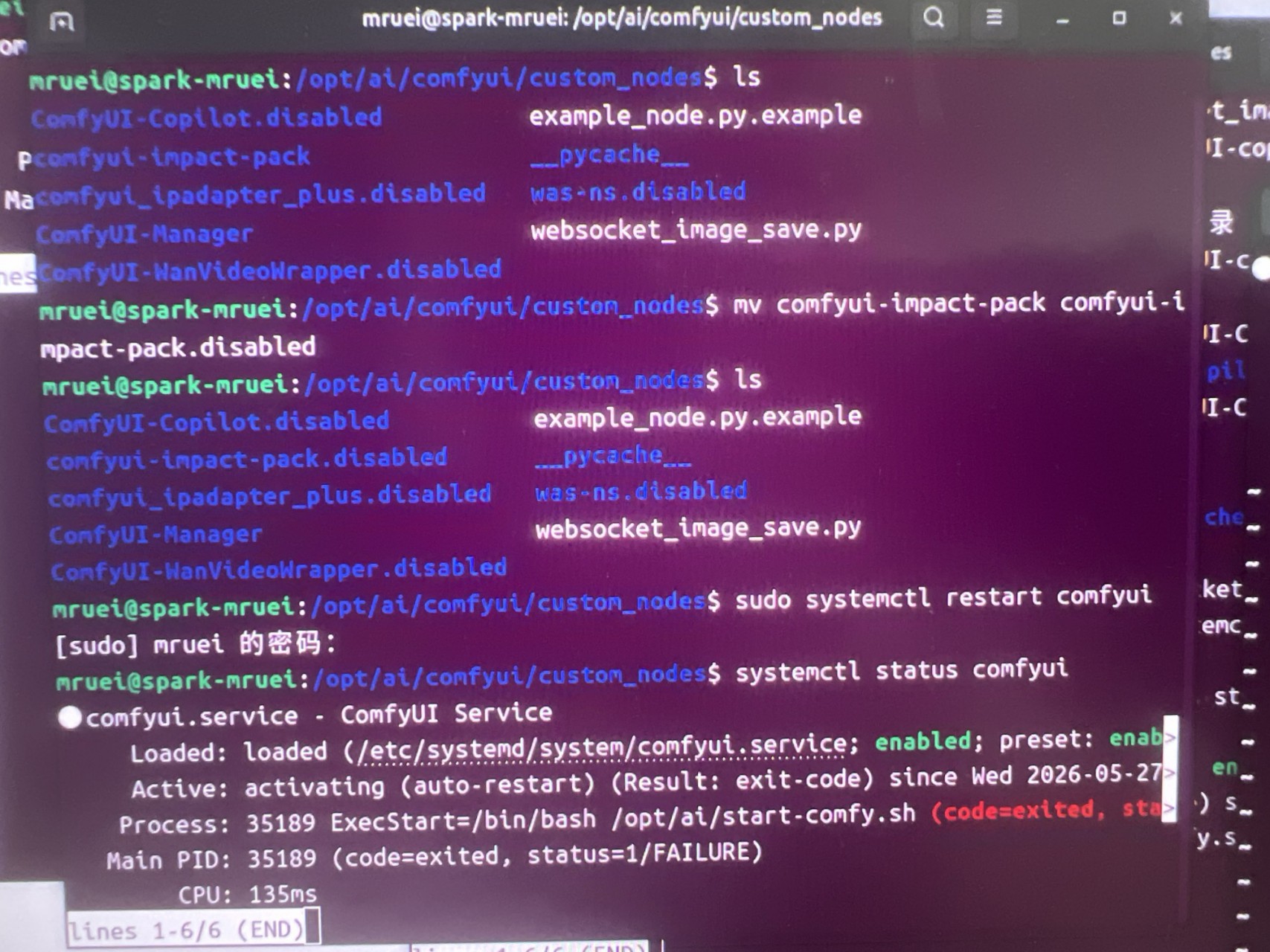
仍未能解决问题,不是某一个节点导致崩溃,我已经把几乎所有 custom_nodes 禁用了,ComfyUI 仍然无法启动。(图上底部是修复后显示的正常结果)文章源自EightPoint-https://www.8oio.com/comfyui%e8%8a%82%e7%82%b9%e5%ae%89%e8%a3%85%e6%97%b6%e7%9a%84%e6%95%85%e9%9a%9c%e6%8e%92%e6%9f%a5%e4%b8%8e%e8%a7%a3%e5%86%b3/567/
最后不通过 systemd,直接手动启动。执行命令文章源自EightPoint-https://www.8oio.com/comfyui%e8%8a%82%e7%82%b9%e5%ae%89%e8%a3%85%e6%97%b6%e7%9a%84%e6%95%85%e9%9a%9c%e6%8e%92%e6%9f%a5%e4%b8%8e%e8%a7%a3%e5%86%b3/567/
source /opt/ai/venvs/comfyui/bin/activate
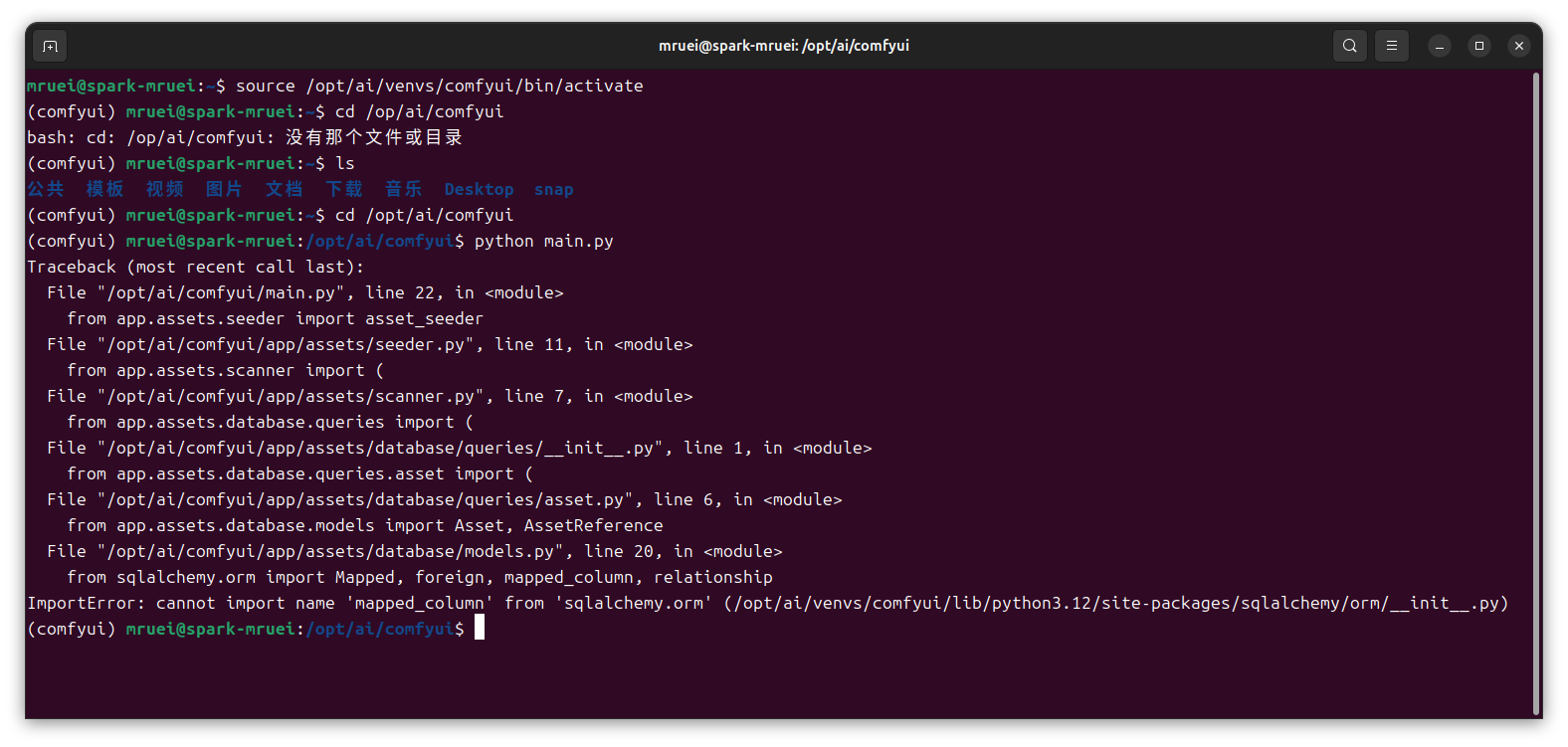
然后进入comfyui目录直接执行,会直接显示真实报错,而不是systemd那种废信息。文章源自EightPoint-https://www.8oio.com/comfyui%e8%8a%82%e7%82%b9%e5%ae%89%e8%a3%85%e6%97%b6%e7%9a%84%e6%95%85%e9%9a%9c%e6%8e%92%e6%9f%a5%e4%b8%8e%e8%a7%a3%e5%86%b3/567/
cd /opt/ai/comfyui
python main.py
 文章源自EightPoint-https://www.8oio.com/comfyui%e8%8a%82%e7%82%b9%e5%ae%89%e8%a3%85%e6%97%b6%e7%9a%84%e6%95%85%e9%9a%9c%e6%8e%92%e6%9f%a5%e4%b8%8e%e8%a7%a3%e5%86%b3/567/
从上图可看出报错:ImportError: cannot import name 'mapped_column' from 'sqlalchemy.orm',我的SQLAlchemy 版本太旧了,需要SQLAlchemy 2.x,环境只有1.0,新版 ComfyUI需要2.0及以上,所以启动直接崩。文章源自EightPoint-https://www.8oio.com/comfyui%e8%8a%82%e7%82%b9%e5%ae%89%e8%a3%85%e6%97%b6%e7%9a%84%e6%95%85%e9%9a%9c%e6%8e%92%e6%9f%a5%e4%b8%8e%e8%a7%a3%e5%86%b3/567/
所以为什么会这样,原因只有一个,安装某个节点时,执行了:pip install -r requirements.txt,结果把 sqlalchemy 降级了。文章源自EightPoint-https://www.8oio.com/comfyui%e8%8a%82%e7%82%b9%e5%ae%89%e8%a3%85%e6%97%b6%e7%9a%84%e6%95%85%e9%9a%9c%e6%8e%92%e6%9f%a5%e4%b8%8e%e8%a7%a3%e5%86%b3/567/
修复方法:
1、进入虚拟环境,否者直接升级报错:externally-managed-environment
source /opt/ai/venvs/comfyui/bin/activate
左边应变成(comfyui),这是Linux AI部署最核心概念,必须始终区分系统Python是Ubuntu自己用,venv是comfyui专用。
2、升级 SQLAlchemy,执行
pip install -U "sqlalchemy>=2.0"
3、验证版本
python -c "import sqlalchemy; print(sqlalchemy.__version__)"
确认是2.x.x即可。
4、重新启动 ComfyUI
cd /opt/ai/comfyui
python main.py
出现Starting server或To see the GUI go to:,说明已经修好了。
5、恢复 systemd执行
sudo systemctl restart comfyui
systemctl status comfyui
如果出现active (running),说明正常,反之再手动启动,查看下一个报错,往往一个依赖修好后
可能暴露下一个依赖问题。
后续永久维护方案:
1、马上备份当前可用环境
cp -r /opt/ai/venvs/comfyui /opt/ai/venvs/comfyui-backup
2、导出当前依赖
source /opt/ai/venvs/comfyui/bin/activate pip freeze > /opt/ai/comfyui-requirements-working.txt
以后再出问题,1分钟内恢复修复。